Flexible Stone Buying Guide
Updated
Ordering flexible stone from a photograph alone can leave the finish, wall system and quantity unresolved. Buy flexible stone by matching a named product to the wall application, reviewing its physical sample and documents, then pricing a measured layout with packing and destination included.
Start with samples when the finish is undecided, or send your wall brief for a quote when a product and approximate quantity are known.
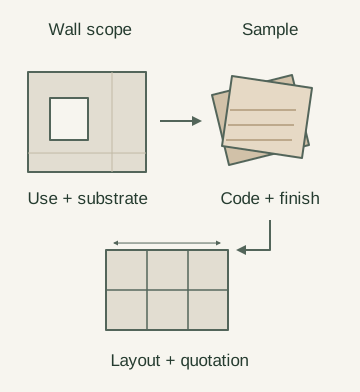
Keep the wall brief, sample identity and layout together through the buying process.
Procurement steps
Scroll the table horizontally to see all columns.
| Step | Required input | Completion record |
|---|---|---|
| 1. Application | Wall use, substrate and exposure | Written wall scope |
| 2. Texture | Reference image and finish direction | Named product shortlist |
| 3. Specification | Product code and required documents | Files matched to the selected format |
| 4. Sample | Shortlisted products and project lighting | Recorded sample review |
| 5. Quantity | Dimensions, openings and sheet direction | Marked wall layout |
| 6. Quotation | Finish, quantity, packing and destination | Itemized order proposal |
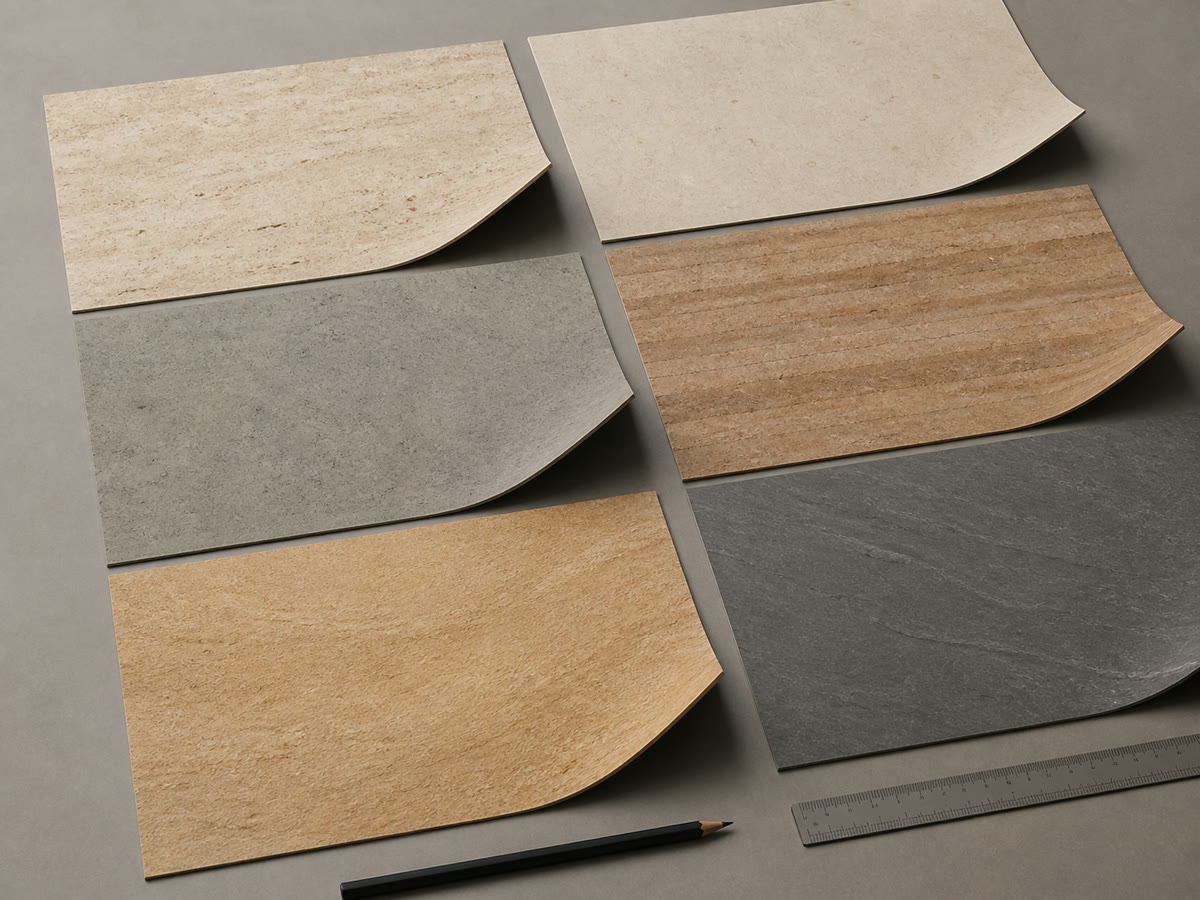
Step 1: Define the wall application
Record whether the brief covers an interior feature wall, renovation over an existing surface, a curved wall or an exterior wall. Include substrate condition, exposure, openings and the project's document requirements before choosing a finish. An exterior application needs review of the selected product and complete wall assembly; sample appearance approval covers a different decision.
Step 2: Shortlist a named finish
Use the Architectural Texture Series to identify candidate products. Travertine-look, concrete-look and rammed-earth-look describe designed appearances. Save each product code with its reference image and preferred orientation so the sample request and quotation refer to the same finish.
For directional finishes, mark the intended direction on the wall elevation and sample photograph. A rotated piece may change the visual pattern even when its dimensions fit.
Step 3: Match documents to the product and wall
Confirm the candidate sheet's dimensions, thickness and weight basis through the sizes, thickness and weight guidance. Request the available data sheet, installation instructions and project-required reports for that product through technical document guidance. Check the named product, format, report date and described specimen or assembly against your proposed use.
Read the test method as well as the reported result. For example, ASTM E84's public scope and significance describe surface flame-spread and smoke measurements under defined exposure conditions. A flame-spread index alone does not establish noncombustibility. Match a report to the specified product and assembly before the project reviewer decides whether it satisfies the project requirements.
For substrate and adhesive selection, use the adhesives and substrates guide together with the selected product instructions. Keep unknown limits as questions for the document request. If a proposed curve is tighter than the documented minimum radius for the selected product and direction, pause that selection and request a suitable product or revised detail. No category-wide bend limit can resolve that decision.
Step 4: Judge physical samples
Request samples of the shortlist and keep a labelled reference for the approval discussion. Record these five checks under project lighting; follow the selected product instructions for any bending or cutting trial.
| Sample check | What to record | Dominant failure mode & prevention |
|---|---|---|
| Face texture | Close and wider photographs of relief under project lighting | An attractive close-up can hide the wall-scale effect; review both views. |
| Colour | Sample and project palette in one image | A screen-only selection can miss a colour mismatch; compare the physical materials together. |
| Flex behaviour | Product, direction and proposed curve on a marked drawing | A sample flexed in another direction cannot settle the proposed detail; check the documented limits and intended direction. |
| Edge and back | Face, edge, back and product-label photographs | A face-only record can lose the backing or product identity; keep all views tied to the same sample. |
| Cutting | Method used and resulting edge | An unreviewed cut edge can leave a visible finish issue; assess a trial made under the product instructions. |
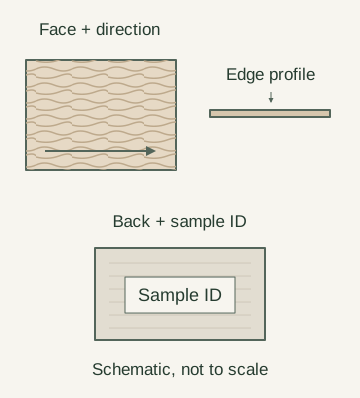
Photograph these views of the same labelled sample. The schematic specifies no layer composition or thickness.
Keep the approved sample reference and review notes for later batch discussions; the quality-control process explains comparison with an approved sample. A sample-review record documents appearance and handling observations; product reports and wall-assembly review address performance requirements.
Send the candidate product codes, wall use and sample requirements to request a quotation or confirm sample contents and available product files. We reply within 24 hours.
Step 5: Calculate quantities from the layout
Use area division as a first check, then count whole sheets on the wall-by-wall layout. Measure openings, returns and corners, mark sheet direction, and identify which offcuts can actually be reused before agreeing the order quantity.
The formulas are sheet area = length × width and area-equivalent sheets = net wall area ÷ sheet area. Order area is whole sheets purchased × sheet area; unused area in a simple layout is purchased area − area used.
For an illustrative calculation, assume a 3.00 m wide × 2.40 m high wall, no openings, and a candidate 1.20 m × 2.40 m sheet placed vertically. These are arithmetic assumptions; confirm the selected product's available format. Joints and cutting kerf are omitted from this sketch.
Wall = 3.00 × 2.40 = 7.20 m²; sheet = 1.20 × 2.40 = 2.88 m²; area quotient = 7.20 ÷ 2.88 = 2.5 sheets.
The drawn layout needs 3 whole sheets: two full widths plus half of the third. Purchased area is 3 × 2.88 = 8.64 m²; the remaining half-sheet is 8.64 − 7.20 = 1.44 m². It becomes usable material for another location only if its dimensions and direction suit that location.
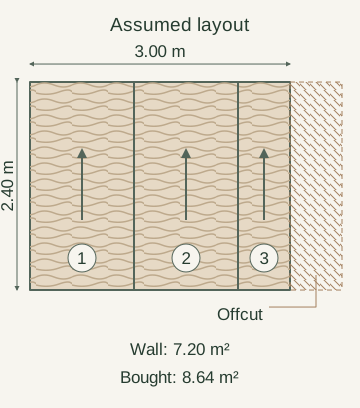
The solid rectangle is the wall; hatching shows the offcut. Arrows show the assumed sheet orientation. This geometry example excludes joints, kerf and project-specific allowances.
If wall height exceeds the sheet's usable length in the approved direction, a single full-height sheet cannot cover it; mark the horizontal joint or revise the format before counting. Prepare a numbered wall grid and cut schedule when several walls, openings or repeated cuts need coordination.
Step 6: Compare the complete quotation scope
A lower sheet price can still produce a higher installed wall cost when the quotation leaves preparation, cutting or delivery outside its scope. Compare offers against the same named product, measured layout, packing request and destination, using the flexible stone price guide to organize the price factors.
For your project cost ledger, add the quoted material, preparation, fixing and finishing, packing, transport and destination costs. Record retained spares and any later replacement shipment separately. Use project-specific rates and mark exclusions before comparing totals.
| Cost entry | Record on the same basis | Dominant failure mode & prevention |
|---|---|---|
| Sheets, cuts and spares | Sheet format, whole-sheet count, reuse of offcuts, separately agreed spares | A net-area quote can omit material needed for cuts; reconcile it to the marked layout. |
| Substrate preparation | Existing wall condition and preparation scope | Unpriced preparation can change the installed cost; ask the installer to identify it before ordering. |
| Adhesive and finishing | Selected system, joints, corners and exposed edges | Incomplete system pricing leaves finishing work outside the comparison; list included materials and work. |
| Packing and freight | Packing, labelling, freight mode and stated delivery terms | Different freight endpoints can make prices incomparable; compare the same destination and scope. |
| Destination and handover | Included or excluded destination handling, taxes and site unloading | Omitted arrival costs or missing labels can disrupt handover; record exclusions and required identification. |
Review packaging and shipping inputs for the proposed order. Keep requested arrival dates distinct from confirmed delivery terms. For a top-up order, retain the original product and finish reference, approved sample, order reference and batch labels so the new batch can be discussed before purchase.
Method and sources
Updated 18 October 2026. The buying steps and enquiry inputs follow the published sample process, quotation process and linked product-document, installation and shipping guidance. The ASTM E84 reference uses only its public Scope and Significance and Use summary, checked on this date, to explain report scope; it assigns no rating to a product. The quantity sketch is an explicitly assumed geometric example. Product limits, available reports, quantities and delivery terms require confirmation for the selected order.
FAQ
Can I ask for a quote before all walls are measured?
Yes. Provide the approximate area and available drawings, label the quantity preliminary, and identify the unmeasured walls. The quotation process accepts project context; a final order still needs an agreed quantity and scope.
How should I prepare a later top-up request?
Keep the original order reference, product code, finish, approved sample and batch-label photographs. Send those with the additional quantity through Get a Quote, and ask about the proposed batch before ordering. The reference record supports comparison; it does not guarantee that a later batch will look identical.
Can I request an MCM technical data sheet?
Yes. Name the product, format, intended use and document requirements through technical document guidance. Confirm which files are available for that product; one report should not be assumed to cover every finish or format.
What is the flexible stone MOQ?
Confirm it for the named finish, format and proposed quantity when requesting the quotation. This guide sets no universal minimum order quantity.
What to send us
Scroll the table horizontally to see all columns.
| Item | Why we need it | Example format |
|---|---|---|
| Candidate model and finish | Identify the quotation scope | Product links or codes |
| Selected sample | Tie the finish to the reviewed reference | Label and sample photos |
| Application and substrate | State the wall and assembly conditions | Wall photos and notes |
| Quantity and layout | Review area and cutting assumptions | Dimensioned PDF with openings |
| Packing and destination | Define the shipping scope | Packing request and destination |
We reply within 24 hours.
Send your project details